Motivation
Databases need flexible query patterns. A KV store with only Get, Put, and Scan would frustrate users—real workloads are richer. For orders: “this user’s orders in the last three months” needs at least (1) filter by user and (2) filter by time range, combined with AND. Scanning the whole table on the client and filtering locally would crush the cluster. Server-side filters are required.
You also see OR, e.g. orders for Alice or Bob in the last three months—AND vs OR, often mixed. HBase provides Filter and FilterList to combine filters with AND or OR.
Example: row keys prefixed with abc and value testA:
fl = new FilterList(MUST_PASS_ALL,
                new PrefixFilter("abc"),
                new ValueFilter(EQUAL, new BinaryComparator(Bytes.toBytes("testA")))
);
FilterList children can be nested FilterLists. Example: prefix abc, family f, value testA or testB:
fl = new FilterList(MUST_PASS_ALL,
                new PrefixFilter("abc"),
                new FamilyFilter(EQUAL, new BinaryComparator(Bytes.toBytes("f"))),
                new FilterList(MUST_PASS_ONE,
                    new ValueFilter(EQUAL, new BinaryComparator(Bytes.toBytes("testA"))),
                    new ValueFilter(EQUAL, new BinaryComparator(Bytes.toBytes("testB")))
                )
);
FilterList is a multi-way tree: leaves are concrete filters (PrefixFilter, ValueFilter, …); internal nodes are FilterLists for sub-expressions:
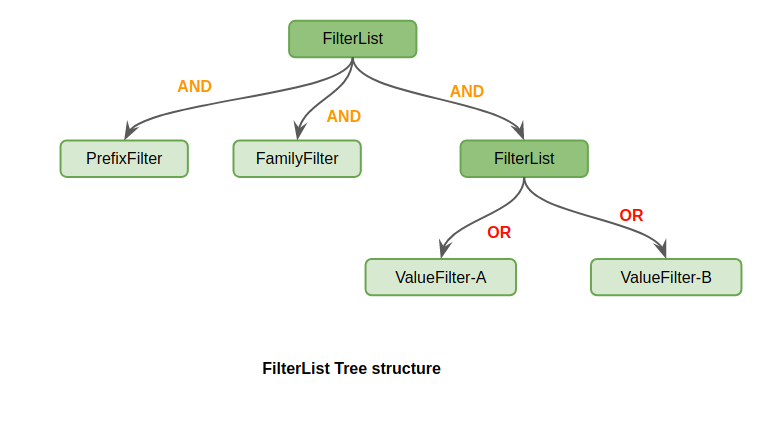
HBase also has SkipFilter for NOT semantics. Example: prefix abc, family f, value neither testA nor testB:
fl = new FilterList(MUST_PASS_ALL,
               new PrefixFilter("abc"),
               new FamilyFilter(EQUAL, new BinaryComparator("f")),
               new SkipFilter(
                   new FilterList(MUST_PASS_ONE,
                        new ValueFilter(EQUAL, new BinaryComparator(Bytes.toBytes("testA"))),
                        new ValueFilter(EQUAL, new BinaryComparator(Bytes.toBytes("testB")))
                   )
               ));
Implementation
Filter and FilterList form a framework with hooks for custom filters. Built-ins include PrefixFilter, RowFilter, FamilyFilter, QualifierFilter, ValueFilter, ColumnPrefixFilter, and more.
Many filters need not scan from startRow to endRow—semantics allow skipping data and reducing IO and comparisons. For PrefixFilter(“333”), only rows with that prefix matter.
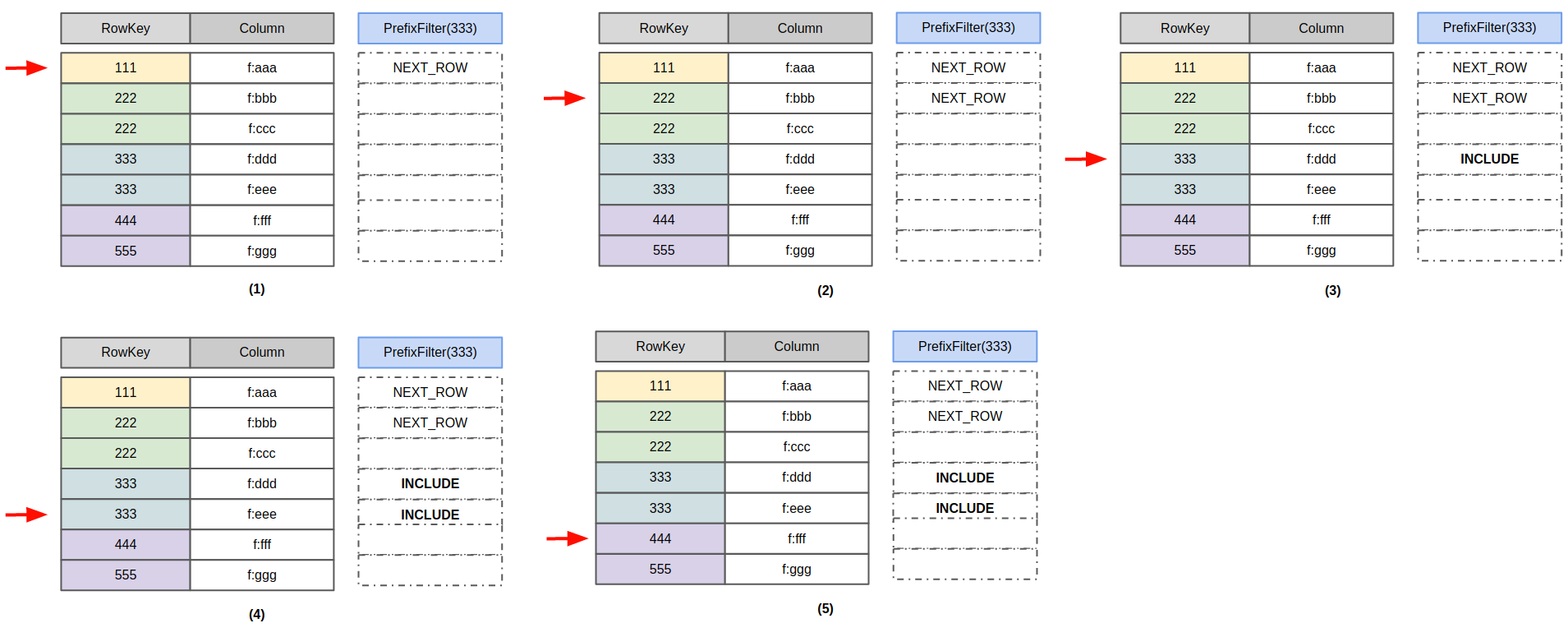
Scan flow:
- Row
111is less than prefix333→ skip row, return NEXT_ROW; - Row
222still less → NEXT_ROW; - Row
333matches → returnf:ddd, INCLUDE; - Still
333→ returnf:eee, INCLUDE; - Row
444exceeds prefix → stop.
Return codes (NEXT_ROW, INCLUDE, …) tell the RegionServer scan framework where to go next. At step 2, NEXT_ROW means the next cell must have row key > 222, skipping f:ccc and landing on 333.
Filters use six codes: INCLUDE, INCLUDE_AND_NEXT_COL, SKIP, NEXT_COL, NEXT_ROW, SEEK_NEXT_USING_HINT. INCLUDE returns the cell and advances; INCLUDE_AND_NEXT_COL returns the cell and skips remaining cells in the same column. SEEK_NEXT_USING_HINT lets the filter supply the next cell—PrefixFilter could jump from 111 to 333 but does not today.
FilterList merges child return codes per cell. For:
fl = new FilterList(MUST_PASS_ALL,
                new PrefixFilter("abc"),
                new ValueFilter(EQUAL, new BinaryComparator(Bytes.toBytes("testA")))
);
On row abb, value testA (Cell-A): PrefixFilter returns NEXT_ROW, ValueFilter returns INCLUDE. For MUST_PASS_ALL (AND), take the code with the largest skip distance: max(NEXT_ROW, INCLUDE) = NEXT_ROW.
For AND, use the maximum skip among children; for OR, the minimum. That merge logic is FilterList’s core—refactored in HBASE-18410; HBase 1.4.x+ uses the new code for stricter semantics.
Optimizations
1. Use StartRow and StopRow instead of PrefixFilter
PrefixFilter returns all rows with a given prefix. This scan works but is inefficient:
Scan scan = new Scan();
 scan.setFilter(new PrefixFilter(Bytes.toBytes("def")));
Rows in (-∞, def) are examined one by one until the first def* row. PrefixFilter does little query-specific optimization. Setting startRow lets the RegionServer seek there first:
Scan scan = new Scan();
 scan.setStartRow(Bytes.toBytes("def"));
 scan.setFilter(new PrefixFilter(Bytes.toBytes("def")));
Best: scan [def, deg) without PrefixFilter:
Scan scan = new Scan();
 scan.setStartRow(Bytes.toBytes("def"));
 scan.setStopRow(Bytes.toBytes("deg"));
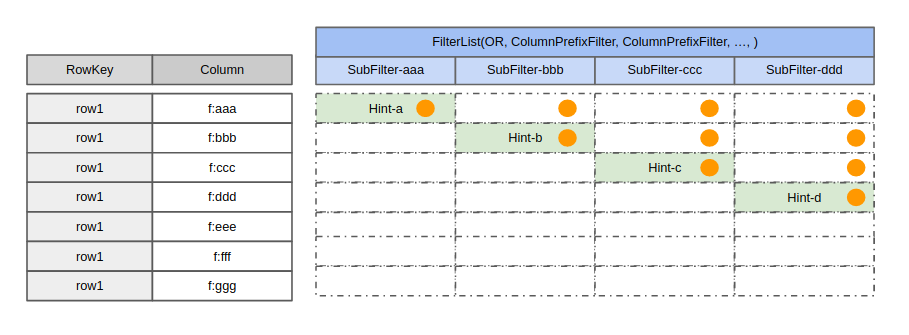
2. Replace FilterList(OR, ColumnPrefixFilter, …) with MultipleColumnPrefixFilter
HBASE-22448: this pattern is very slow:
fl = new FilterList(MUST_PASS_ONE,
    new ColumnPrefixFilter(Bytes.toBytes("aaa")),
    new ColumnPrefixFilter(Bytes.toBytes("bbb")),
    ...
    new ColumnPrefixFilter(Bytes.toBytes("zzz"))
)
Each orange dot is a cell compare:
Use MultipleColumnPrefixFilter instead:
fl = new MultipleColumnPrefixFilter(byte[][] {
    Bytes.toBytes("aaa"),
    Bytes.toBytes("bbb"),
    ...,
    Bytes.toBytes("zzz")
 });
Fewer compares:
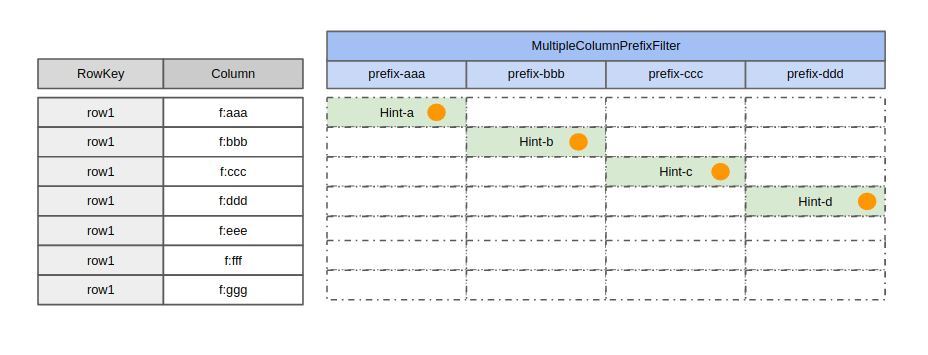
HBASE-22448 benchmarks showed ~20× speedup. Lesson: when FilterList is too generic for your workload, a custom filter with fewer compares may win—FilterList must preserve general correctness.
3. SingleColumnValueFilter semantics
This filter is easy to misunderstand:
Scan scan = new Scan();
SingleColumnValueFilter scvf = new SingleColumnValueFilter(
    Bytes.toBytes("family"),
    Bytes.toBytes("qualifier"),
    CompareOp.EQUAL,
    Bytes.toBytes("value")
);
scan.setFilter(scvf);
It looks like “return cells where family:qualifier equals value,” but rows missing that column are still returned by default. To exclude them:
Scan scan = new Scan();
SingleColumnValueFilter scvf = new SingleColumnValueFilter(
    Bytes.toBytes("family"),
    Bytes.toBytes("qualifier"),
    CompareOp.EQUAL,
    Bytes.toBytes("value")
);
scvf.setFilterIfMissing(true); // skip rows without the column
scan.setFilter(scvf);
With filterIfMissing(true) inside FilterList, results can be wrong (HBASE-20151): the filter must scan every cell in a row, but another filter’s NEXT_ROW can skip families before SingleColumnValueFilter finishes. Recommendation: avoid combining SingleColumnValueFilter with other filters in FilterList; prefer ValueFilter where possible.
4. PageFilter
HBASE-21332: a table with five regions (-∞, 111), [111, 222), [222, 333), [333, 444), [444, +∞), each with 10,000+ rows. This scan returned more than 3,000 rows:
Scan scan = new Scan();
scan.withStartRow(Bytes.toBytes("111"));
scan.withStopRow(Bytes.toBytes("4444"));
scan.setFilter(new PageFilter(3000));
PageFilter paginates—but filter state is per region. When the scan moves to a new region, the counter resets. So you get:
Up to 3000 rows in [111, 222), then switch to [222, 333).
Up to 3000 rows in [222, 333), then switch to [333, 444).
Up to 3000 rows in [333, 444), then hit stopRow—9000 rows total. Global pagination would need global filter state; HBase has not implemented that by design. For pagination, use limit:
Scan scan = new Scan();
scan.withStartRow(Bytes.toBytes("111"));
scan.withStopRow(Bytes.toBytes("4444"));
scan.setLimit(1000);
In practice PageFilter has limited value.
Summary
The Xiaomi HBase team has maintained Filter and FilterList for years. The read path is already complex (versions, delete markers, TTL, rows, families, columns); Filter is a highly abstract framework for custom logic. Correct, efficient use has a learning curve—this article aims to help.